
A goods received note (GRN) records what a business actually receives from a supplier: which items arrived, in what quantities, when, and in what condition. It connects a physical delivery to the purchase order and gives warehouse, purchasing, and finance teams a shared receipt record.
Start by separating goods received from goods accepted. A carton can arrive at your warehouse while its contents remain on inspection hold. Recording everything as available stock can create a second problem before the first one is resolved: your store sells units that nobody has cleared for shipment.
This guide explains the document, walks through a partial delivery, and provides a blank template you can adapt to your receiving process.
What is a goods received note used for?
A GRN answers a practical question: what can the receiving team confirm about this delivery? It should identify the related order, record actual counts, and make discrepancies visible to the people handling stock and supplier invoices. Tipalti describes the GRN’s role in linking receipt records with procurement and accounts payable. Tipalti’s GRN overview.
Terminology varies. Some businesses call a signed delivery document a GRN; others create a separate goods receipt in their inventory system. Here, “GRN” means the buyer’s receiving record, whether it is a form, spreadsheet, or system transaction. The important point is that it reflects a verified receipt rather than merely repeating the supplier’s stated shipment quantity.
A GRN supports inventory updates and invoice checks. It does not, by itself, confirm that every item passed inspection or that an invoice has been approved for payment.
GRN vs. purchase order, delivery note, and invoice
These documents refer to the same transaction but answer different questions.
| Document | Usually prepared by | Main question |
|---|---|---|
| Purchase order (PO) | Buyer | What did we agree to buy? |
| Delivery note or packing list | Supplier or shipper | What does the sender say is in this delivery? |
| Goods received note | Receiving business, under the workflow used here | What did we actually receive? |
| Supplier invoice | Supplier | What amount is being billed? |
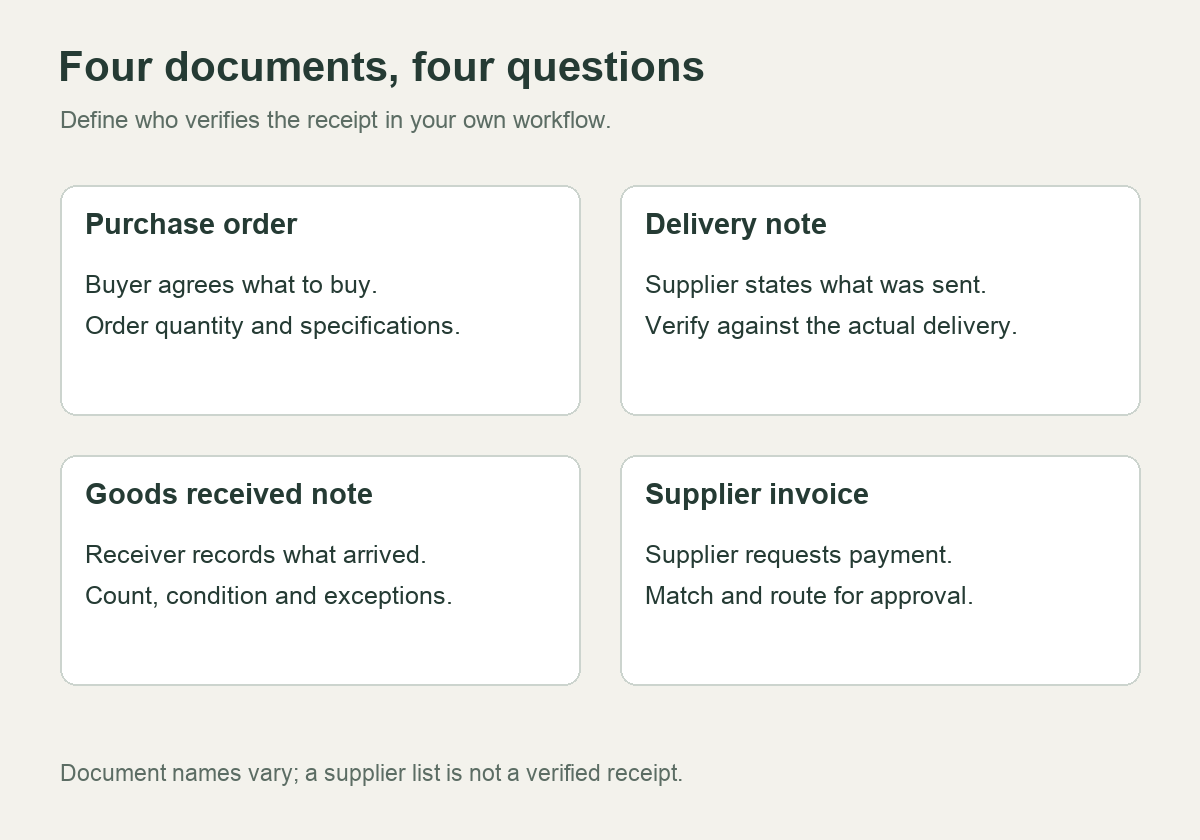
For example, a packing list may show ten cartons. That does not establish the number of individual units inside them. If the PO uses “each” and the warehouse records “cartons,” record the pack size and conversion explicitly. Ten cartons of twelve units and ten cartons of ten units produce different receipts.
Keep the supplier’s document as supporting evidence. Do not replace the warehouse count with its total just to make the paperwork agree.
What should a goods received note include?
Use enough detail for another person to reconcile the delivery without reconstructing the event from messages. The following is a suggested operational field set; it is not a jurisdiction-specific statutory form.
| Field group | Suggested fields | Why they help |
|---|---|---|
| Receipt identity | Unique GRN number, receipt date and time, warehouse | Distinguishes separate deliveries |
| Supplier and order | Supplier name, PO number and line, delivery-note reference | Connects the receipt to the correct purchase |
| Item identity | Internal SKU, description, unit of measure | Prevents variant and pack-size confusion |
| Quantities | PO quantity, expected in this delivery, received in this delivery | Separates an order balance from a shipment shortage |
| Inspection status | Accepted, on hold, rejected; reason and review date | Keeps physical presence separate from release status |
| Traceability | Lot, serial number, expiry date where relevant | Supports later identification |
| Evidence and ownership | Photos or discrepancy reference, receiver, reviewer, follow-up owner | Makes exceptions actionable |
Give quantities clear labels. A field called “received quantity” is ambiguous if one person enters today’s receipt and another enters the cumulative amount received against the whole PO.
Where inspection is incomplete, record a hold. Do not use “rejected” as a temporary label for goods nobody has checked. Conversely, do not call a visibly damaged item accepted simply because it is physically inside the building.
A worked GRN example: 100 ordered, 96 received
Assume a retailer orders 100 units of one SKU. The supplier’s delivery note says all 100 should be in this shipment. The receiving team counts 96. Of those, 92 pass the agreed checks and four are held for a closer inspection.
| Quantity | Units | Interpretation |
|---|---|---|
| Ordered on PO | 100 | Original order quantity |
| Expected in this delivery | 100 | Supplier’s stated delivery quantity |
| Physically received | 96 | Actual count at receipt |
| Accepted | 92 | Passed the specified checks |
| On inspection hold | 4 | Received, but not yet released |
| Rejected | 0 | No final rejection decision yet |
| Short against this delivery | 4 | Expected but not received |
The receipt reconciles as 96 = 92 accepted + 4 held + 0 rejected. The four missing units are outside that receipt total. Adding them to held stock would hide the shortage.
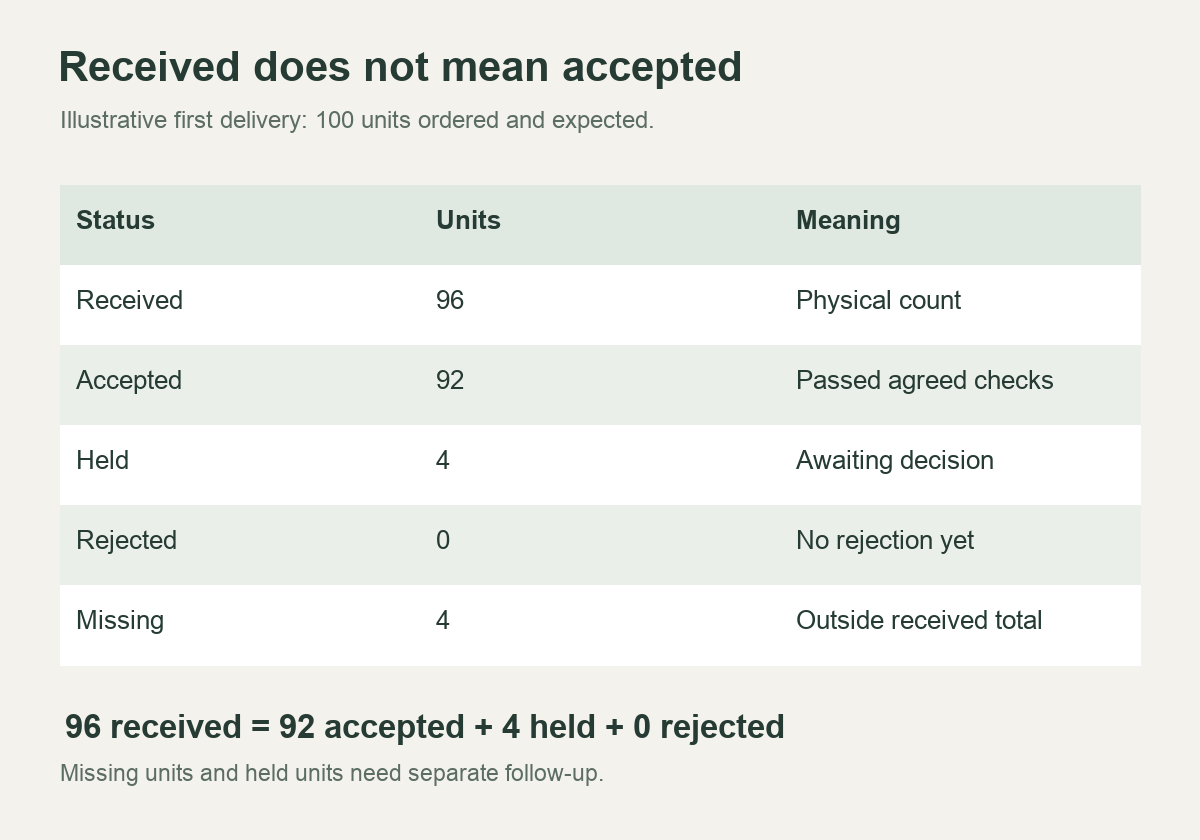
Record two separate follow-ups: purchasing asks the supplier about the four missing units, while the inspection owner decides the status of the four held units. Those are different problems with different evidence and next actions.
Now suppose the missing four units arrive and pass inspection. Create a second receipt for those four units, linked to the same PO line. The cumulative quantity received becomes 100; the cumulative accepted quantity becomes 96. The original four units are still on hold. Receiving the order balance has not resolved their inspection status.
This example assumes no returns, cancellations, or receipt corrections. If any of those occur, record the associated transactions and reconcile the resulting net balances.
A receiving workflow that keeps exceptions visible
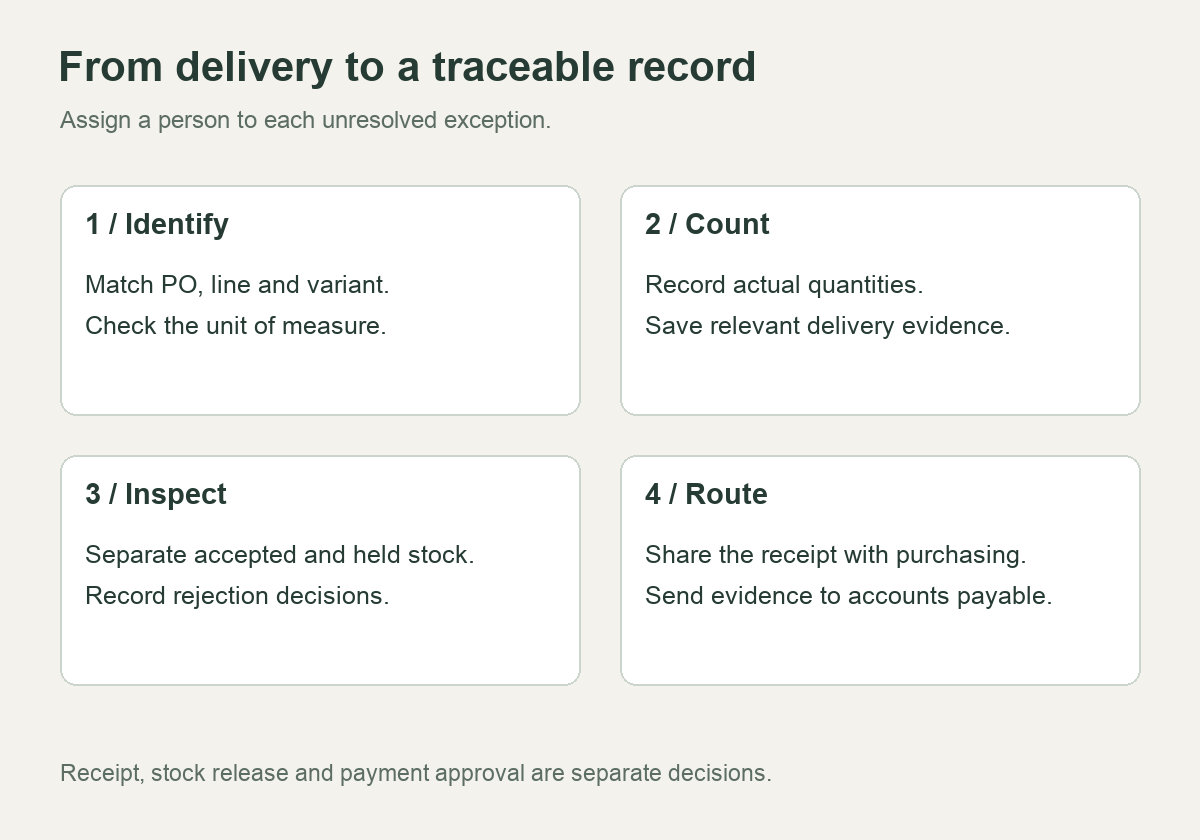
1. Identify the order and expected shipment
Locate the PO and the supplier’s delivery reference before posting stock. Confirm the destination, SKU, variant, and unit of measure. For an unexpected delivery, use your exception process rather than guessing which open order it belongs to.
If a supplier ships several PO lines together, record each line separately. A correct grand total can conceal a shortage of one variant and an excess of another.
2. Count and record what arrived
Record the actual count, receipt time, and visible packaging condition. Note whether your count covers cartons, individual units, or both. Photograph relevant damage, labels, and affected contents; make the evidence reference specific enough to find later.
If the team can count cartons immediately but must count units later, record that limitation. An unverified unit count should not look like a completed inspection.
3. Apply the agreed inspection and release rules
Compare the goods with the purchase specification and any agreed reference sample. Decide which checks the receiving team performs and which require a separate quality review. A quantity check does not establish color accuracy, material compliance, or functional performance.
For imported products, a useful preparation step is to turn the approved sample into written acceptance criteria before production. The guide to Alibaba bulk orders that differ from the sample explains why the reference alone can leave important specifications undefined.
Place held goods in a clearly identified location or system status. Your inventory process should prevent them from being allocated to customer orders until an authorized release occurs.
4. Share the receipt and assign the exception
Send the receipt reference and discrepancies to purchasing and accounts payable through your normal workflow. State who owns each follow-up and when it should be reviewed. “Supplier informed” is incomplete if nobody is responsible for checking the response.
For a new receiving arrangement in China, ask for the records and evidence you need before sending goods. Fulfillbot’s China sourcing service describes quantity and visible-quality checks. Confirm the inspection scope, discrepancy reporting, and release instructions for your order; a general service description does not establish a particular ERP integration or inspection standard.
How a GRN fits into invoice matching
Three-way matching compares the purchase order, supplier invoice, and receipt information. Where acceptance is a separate control, a four-way process also checks accepted quantities. Oracle’s E-Business Suite documentation distinguishes these checks and applies configured quantity and price tolerances. That is an example of a defined system workflow, not a universal rule for every business. Oracle Payables matching documentation.
In the example above, an invoice for 100 units needs reconciliation against the receipt of 96. A receipt-based check also needs to account for the inspection hold if your process requires acceptance before payment. Do not infer that 96 units are automatically payable, or that 92 must always be paid immediately. Contract terms, approvals, credits, prior invoices, and the configured matching process still matter.
Keep the receiving record factual. Finance can then decide how to handle an invoice exception without asking warehouse staff to change the count to match the bill.
Partial deliveries, corrections, and rejected goods
Partial deliveries: create a traceable record for each receipt and maintain a cumulative PO balance. If a supplier intentionally sends 60 of 100 ordered units, a receipt of 60 may fully match that delivery while leaving 40 outstanding on the PO. That is different from a shipment that promised 100 but contained 60.
Corrections: preserve the original receipt and record the correction, reason, date, and responsible person using your system’s audit process. An unexplained overwrite makes it harder to distinguish a counting error from a later movement of stock.
Rejected goods: record the reason, location, disposition decision, and any return or credit reference. Moving goods to a rejection area does not prove that the supplier has collected them or issued a credit. Track those actions separately.
Excess quantities: record what physically arrived and route the excess for a decision. Do not quietly change the PO to make the receipt appear authorized. Whether excess goods are accepted, returned, or added to the order depends on the agreed process.
Download a blank goods received note template
Use the blank GRN spreadsheet template for one row per PO line and receipt. A printable receiving form (PDF) is also included.
Start by defining your units, inspection statuses, and correction process. Then adapt the fields to your inventory system. The template does not automatically update inventory, approve payments, or reconcile earlier receipts.
For each completed record, check three things: the actual receipt is traceable to a PO line, the received quantities reconcile across inspection statuses, and every unresolved discrepancy has an owner. The record should still make sense when someone reviews the delivery a week later.
Frequently asked questions
Who prepares a goods received note?
In the workflow described here, the receiving team creates or verifies it. Procurement supplies the order details, inspection staff determine acceptance where required, and finance uses the record for matching. Businesses may use different names or combine documents, so agree who verifies the actual quantities.
Is a GRN the same as a delivery note?
Not necessarily. A supplier’s delivery note states what was sent; a receiving record states what the buyer verified. A signed or annotated delivery note may serve both purposes in some processes, provided the recorded count and exceptions remain clear.
Can a GRN be electronic?
Yes. The useful controls are traceable identity, accurate quantities, defined statuses, evidence, and a correction history. A paper form and an electronic transaction can both fail if they simply copy the expected quantity without checking the delivery.