
If your Taobao account gets locked right after sign-up, the usual cause is not a bad password. It is Taobao’s risk-control system deciding that your phone number, network, device, or login pattern looks suspicious. For most overseas users, the fastest path back in is to verify identity through Alipay first, then return to Taobao and finish any pending passport or account checks.
This guide explains why the lock happens, how to fix the most common SMS and “security risk” loops, and when it makes more sense to stop retrying and call support.
Quick fix: the fastest way to unlock a Taobao account
If your Taobao account is locked right after sign-up, the fastest fix for most overseas users is to stop repeated login attempts, turn off VPN, complete passport verification in Alipay, confirm the same Alipay account is linked to Taobao, and retry the verification flow on one device.
A Taobao security risk warning usually means the platform wants stronger identity verification. It does not always mean the account is permanently banned.
For overseas users, Taobao login recovery often depends on whether the linked Alipay account has already passed identity verification.
Quick fix checklist
- Stop repeated login attempts for a while.
- Turn off VPN and stay on one network.
- Complete passport verification in Alipay.
- Make sure the same Alipay account is linked to Taobao.
- Retry the verification flow on the same phone.
- If SMS or document upload still fails, contact support with screenshots.
Troubleshooting matrix
Problem | What it usually means | Best next step |
|---|---|---|
SMS code not arriving | Carrier, network, or message filtering problem | Turn off VPN, stay on one network, check carrier filtering, retry later |
Security risk warning | Taobao wants stronger identity proof | Verify Alipay first, then retry Taobao on one device |
Passport upload not working | App, cache, permissions, or unstable upload flow | Clear cache, reinstall, check photo permissions, retry with a clean passport image |
Alipay already verified but Taobao is still locked | Link or account-state mismatch | Confirm the same Alipay account is linked, then retry or escalate to support |
Why Taobao locks new overseas accounts
Taobao has become much stricter with newly created foreign accounts. Public troubleshooting guides for overseas users repeatedly describe the same pattern: the account is created, login works briefly, then the app throws a risk warning, asks for more checks, or refuses uploads.
That does not prove every lock has the same technical trigger. But the practical pattern is clear. Accounts are more likely to get flagged when they combine several of these signals:
- an overseas phone number
- switching between Wi-Fi and mobile data right after signup
- using a VPN or changing IP regions
- logging in on multiple devices too quickly
- creating the account but not completing passport or Alipay verification
A third-party guide aimed at overseas Taobao users lists similar triggers, including frequent network changes, multiple devices, and jumping between different Taobao versions. That source is not official, so it is best treated as directional rather than final policy.
Taobao SMS verification not working: what to do
A non-Chinese number is not automatically disallowed. Taobao and Alipay do support international users. The issue is reliability.
Some overseas carriers delay or block short verification messages from China. Alibaba Cloud’s official help documentation, while not Taobao-specific, describes the same basic failure points you see with Chinese-platform verification in general: security apps may block messages, carriers may blacklist them, mobile service may be unstable, and retrying too often can push you into an appeal flow.
If your Taobao SMS code is not arriving, try this order instead of repeatedly hammering the resend button:
- Turn off any VPN.
- Stay on one stable network for the whole attempt.
- Confirm your carrier can receive international verification texts.
- Check whether spam filters or security apps are blocking unknown senders.
- Wait a few minutes before requesting another code.
- If possible, try during China business hours, when support escalation is easier if the loop continues.
For UK and US users, the ugly truth is that the phone number may be usable for registration but still unreliable for repeated security checks. That is one reason Alipay verification matters so much.
What Taobao, Alipay, and passport verification each do
For overseas users, Taobao, Alipay, phone verification, and passport verification play different roles in the same recovery flow.
- Taobao handles the shopping account and the login restriction itself.
- Alipay often acts as the identity layer that proves the account belongs to a real person.
- SMS verification checks whether the phone number can still receive security codes.
- Passport verification gives the platform stronger identity proof when the account is flagged.
That is why a locked Taobao account can sometimes be recovered only after the linked Alipay account passes identity verification.
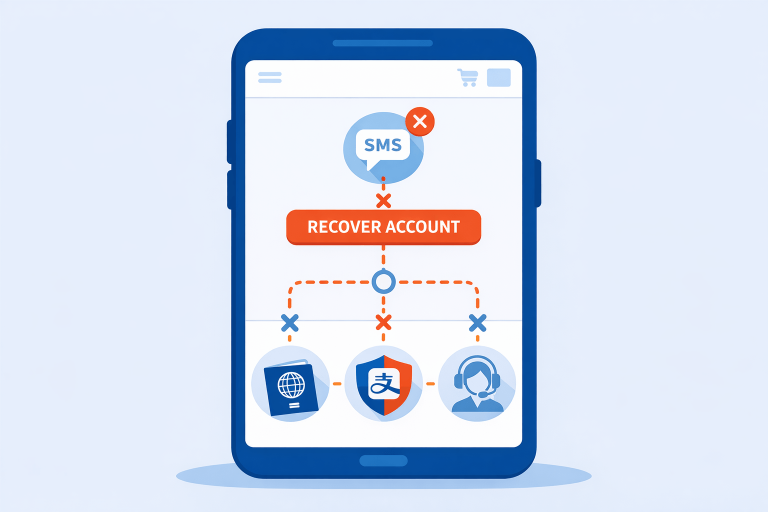
How to use Alipay verification to bypass Taobao login blocks
For international users, Taobao and Alipay often behave like two halves of the same identity system. If Taobao blocks you but Alipay still lets you verify your passport and identity details, that sometimes clears the path for Taobao access.
Overseas-user troubleshooting guides consistently point to the same fix: complete both Taobao and Alipay real-name checks and make sure the details match exactly.
Here is the cleanest sequence to try:
Step 1: Verify your Alipay identity first
Open Alipay and go to the identity or real-name verification section. Prepare:
- a valid passport
- your name exactly as it appears on the passport
- a clear photo of the passport info page
- any required face scan or selfie check
If Alipay verification fails because of a mismatch, do not keep submitting variations of your name. Re-enter it in the exact passport order and formatting used on the document.
Step 2: Link the same Alipay account to Taobao
Once Alipay is verified, check whether Taobao is actually linked to that same Alipay account. Some users think they are verified because Alipay works, but Taobao is still pointing to a different or unlinked payment identity.
Step 3: Return to Taobao and retry the security check
After Alipay is verified, go back to Taobao and attempt the verification flow again. If Taobao offers “other verification methods” or passport authentication, use that rather than starting over with a fresh account.
Step 4: Avoid changing variables mid-process
Do not switch devices, swap SIMs, or bounce between app versions while you are already in the recovery flow. That can make a borderline account look even riskier.
If you use Taobao for sourcing research, not just shopping, this is especially important. Cross-border procurement workflows are already messy enough. Our guide to buying direct from China explains why Chinese platforms often add friction for overseas buyers even before payment and shipping enter the picture.
Taobao security risk error: how to clear it
The “Security Risk” or account restricted message usually means the system wants stronger identity proof, not that the account is permanently dead.
Try these fixes in order:
Use the official app version
If your app is outdated or buggy, install the latest official build from the app store or Taobao’s official site where available. Some user reports mention reinstalling the APK as a workaround when the in-app verification screen breaks.
Clear cache or reinstall
If the verification page loads but buttons do nothing, clear the app cache first. If that fails, delete and reinstall the app.
Stay on one device
Do the full recovery on the same phone you used most recently for the account. Taobao may treat a second device as a new risk event.
Do not create account after account
Many users respond to a lock by opening a second or third account. That can make the problem worse. If Taobao is already flagging your phone number or device, more registrations may reinforce the fraud signal rather than solve it.
Taobao passport verification not working: fix the upload flow
This is one of the most frustrating failure points because the account asks for documents but the app refuses to accept them.
If the upload button is broken or the page freezes:
- Restart the app and try again on the same device.
- Clear cache or reinstall.
- Make sure the passport image is bright, flat, and not cropped too tightly.
- Avoid edited scans with heavy compression or filters.
- Check app permissions for camera and photo access.
- If Taobao keeps failing, complete identity verification inside Alipay first and then come back.
Some overseas guides specifically recommend using passport authentication from the Taobao web flow and then scanning the QR code with the app. That route can work when the in-app flow is unstable.
One more thing: do not guess on document type. Overseas users are usually expected to use a passport, not a local driver’s license or temporary travel paper. Several guides and user reports point to passport verification as the accepted fallback for non-mainland users.
What to do after Alipay is verified but Taobao is still locked
Sometimes Alipay is already verified, but Taobao still shows a restriction. In that case, the issue is usually no longer basic identity setup. It is more often one of these:
- the wrong Alipay account is linked to Taobao
- Taobao has not refreshed the verified status yet
- the account was flagged for device or network behavior in addition to identity risk
- the recovery flow is stuck because the app upload or SMS step is broken
If this happens, work through this order:
- Confirm the exact Alipay account linked to Taobao.
- Retry on the same device and same network.
- Clear cache or reinstall the Taobao app.
- Retry passport or security verification once.
- If the status does not change, move to support instead of repeating the loop.
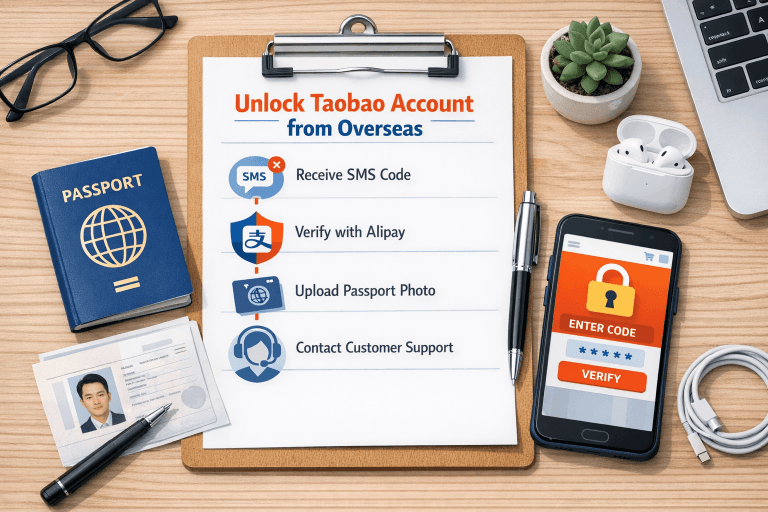
When to stop troubleshooting and contact support
If you have already done all three of these things, it is time to escalate:
- verified or attempted to verify through Alipay
- retried on a clean app install
- failed to receive or complete Taobao’s SMS or document flow
If the account is already banned and the app flow no longer works, calling support may be the only practical next step. In many cases, the first support layer starts in Chinese, so overseas users may need to request English assistance or a callback.
Before calling support, prepare:
- your phone number with country code
- Taobao account name
- linked Alipay account
- passport name exactly as submitted
- screenshots of every error screen
- the approximate date and time of the failed verification attempts
If support asks you to re-submit documents, use the same identity details everywhere. Mismatched names, different email accounts, or different phone numbers across Taobao and Alipay can drag the case out.
If you only need products, not a Taobao account: alternatives
If your real goal is finding products or comparing suppliers, recovering a Taobao account is not always the best use of your time.
That is the decision boundary many overseas buyers miss. If you need a long-term Taobao account for repeated shopping, fixing the account makes sense. If you only need product sourcing, pricing checks, or help buying from Chinese marketplaces, a workaround may be faster than waiting on account recovery.
You can use:
- a sourcing partner who already understands Chinese marketplace workflows
- broader supplier research through this breakdown of Chinese wholesale websites
- a guided procurement route through our roundup of China sourcing agents
- a wider supplier-side workflow explained in our guide to buying direct from China
This does not mean Taobao is unimportant. It means Taobao account recovery should not become a bottleneck if your real task is just getting products sourced.
FAQ
Why does my Taobao account get locked immediately after registration?
The most common reason is automated risk control. New foreign accounts that are unverified, created on unstable networks, or tied to overseas numbers are more likely to get flagged quickly.
How do I get a Taobao SMS verification code in the UK?
First, turn off any VPN and confirm your carrier is not blocking international verification texts. If the code still does not arrive, switch to the Alipay-first verification route instead of requesting endless new SMS codes.
Can I use Taobao without a Chinese phone number?
Yes, many international users do. The issue is not whether it is technically possible. The issue is whether your number and carrier are reliable enough for repeated risk checks.
Is Alipay verification better than Taobao verification for international users?
In practice, it often is. Alipay usually gives overseas users a clearer passport-based identity path, and a verified Alipay account can help unblock the matching Taobao account.
What if the passport upload button still does not work?
Clear the app cache, reinstall the app, check photo permissions, and try the web-to-app QR route. If it still fails, contact support and send screenshots of the broken step.
Should I create a new Taobao account if my first one gets restricted?
Usually no. If the same phone number, device, or network is already flagged, another fresh account may get locked too. It is better to recover the existing account first.
Is Taobao passport verification safe?
Taobao and Alipay both use passport verification as part of real-name checks for overseas users. The practical concern is less about whether passport verification exists and more about whether you are on the official app or official flow when you submit it. If you are unsure, avoid unofficial mirrors and use the app store version or Taobao’s official website flow.
Can I unlock a Taobao account without Alipay?
Sometimes, but Alipay is often the fastest route for overseas users because it handles the identity layer more clearly. If Taobao is locked and Alipay is available, using Alipay first is usually the better recovery path.
What should I do if Taobao still says security risk after Alipay verification?
Check that the same Alipay account is actually linked to Taobao, then retry on one device and one network. If the warning does not clear after that, stop repeating the same actions and contact support with screenshots.
Why does Taobao accept my phone number for sign-up but fail during verification?
Registration and recovery are not always judged the same way. A phone number may be accepted for basic account creation but still fail later if SMS delivery is unstable or the account is flagged for extra verification.
Conclusion
A locked Taobao account usually means the system does not trust the account yet, not that you are permanently banned. For overseas users, the most reliable fix is to stabilize the login environment, complete Alipay passport verification, and then finish Taobao’s pending checks without changing devices or account details halfway through.
If that still fails, stop troubleshooting in circles and escalate to support with screenshots. That is often the point where persistence stops helping and a manual review becomes the only real fix.