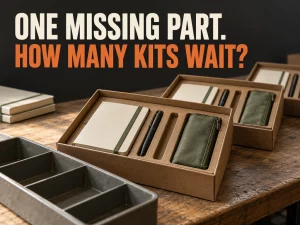
Kitting is the process of collecting specified components into a defined set for a customer order or a production task. In ecommerce, that might mean packing a notebook, two pens, and a pouch as one desk set. In manufacturing, it can mean staging the parts needed for a work order before assembly begins.
Before packing the first box, decide what belongs in it, when its components become unavailable for other orders, and how to handle a missing or returned item.
For an ecommerce operation, a good kitting process connects a component list, physical work instructions, inventory transactions, and a quality check. Start there before deciding how many kits to build.
Kitting, bundling, assembly, and pick and pack
These terms overlap, but they describe different decisions.
| Term | Main focus | Example |
|---|---|---|
| Kitting | Gathering a specified set of components | Preparing a desk set with one notebook, two pens, and one pouch |
| Bundling | Offering products together for sale | Listing that set at a combined price |
| Assembly | Combining parts into a finished item or subassembly | Attaching parts to produce a finished stand |
| Pick and pack | Retrieving and packaging an order for dispatch | Picking the finished desk kit and preparing its shipping parcel |
A bundle can be picked from loose components after purchase. A kit can be prepared before any customer orders it. And manufacturing kitting can supply an assembly station without producing a customer-ready package. Tulip’s kitting application documentation, for example, describes gathering components for a work order and assigning them to a subassembly. Tulip’s kitting workflow.
Software labels also matter. In NetSuite, a Kit/Package item tracks inventory through its members, while an assembly build increases assembly stock and decreases component stock. Those are distinct inventory treatments within that product. A warehouse calling something a “kit” does not tell you which treatment your system uses. NetSuite groups, assemblies, and kit/packages.
Ask which stock records will change when the team builds and ships the kit.
Should you pre-kit or build after the order?
Pre-kitting means preparing sets in advance. Order-time kitting means collecting and packing the components after an order arrives.
| Decision | Pre-kit | Kit after the order |
|---|---|---|
| When labor happens | Before customer demand is confirmed | During order processing |
| Component flexibility | Components may be reserved inside finished kits | Components remain available until allocation |
| Useful fit | Stable, repeated combinations | Variable combinations or uncertain demand |
| Main exposure | Unsold kits, rework, and storage | More work during the dispatch window |
| Change handling | Existing kits may need opening and rebuilding | New instructions can apply to future orders |
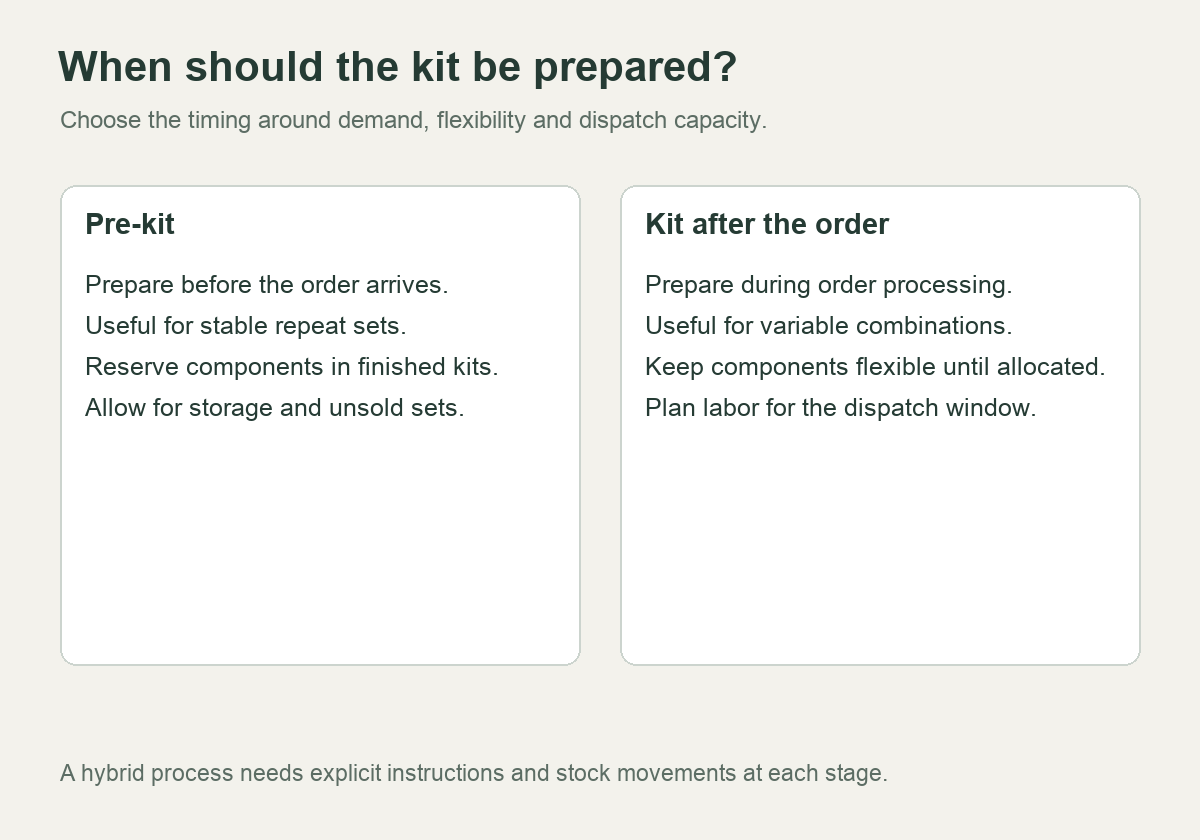
Pre-kitting can move work out of a busy dispatch period. Whether it saves money depends on the batch, storage, and eventual sales. Preparing hundreds of seasonal gift sets early does not help if the insert changes or the offer sells poorly.
Order-time kitting preserves flexibility, but it needs enough labor and a reliable component pick process when orders arrive. A kit with several variants, fragile products, and precise presentation requirements may take longer than its item count suggests.
A hybrid approach is also possible: prepare a stable inner set, then add a variable component or insert later. Document both stages and their inventory effects. Otherwise, the partly prepared set can disappear into an undefined “work in progress” pile.
Define the kit before moving inventory
Create a bill of materials (BOM) or component list for each kit version. For a simple retail kit, the minimum useful record includes:
- Kit identifier, version, and effective date.
- Component SKU, exact variant, quantity per kit, and unit of measure.
- Required packaging, inserts, labels, and any approved substitutions.
- Placement instructions and a reference image of the approved finished pack.
- Quality checks, exception handling, and the person authorized to approve changes.
Avoid descriptions such as “one black pen” when several black pens are in stock. The picker needs the exact item identifier. If the kit contains two pens, the quantity must be explicit in both the work instruction and the inventory rule.
Packaging can be a constraint too. If a branded carton is mandatory and only 30 cartons remain, 45 complete product sets do not mean 45 shippable branded kits. Include required packaging in the build plan even when your software treats it differently from sellable inventory.
Version changes need an effective boundary. Record whether a new insert applies to all unsent orders, only newly placed orders, or the next build batch. Do not silently substitute it while old and new instructions remain active at the packing station.
Calculate how many complete kits you can make
For each required component, divide the quantity available for this purpose by the quantity needed per kit. Round down, then take the smallest result:
Buildable kits = minimum of floor(available component quantity ÷ quantity per kit).
Shopify documents this component-based calculation for bundle availability. It also notes that inventory tracking and “continue selling when out of stock” settings affect which components constrain the displayed quantity. Treat a storefront’s available count as a configured estimate, not proof that a physical kit has been checked. Shopify bundle inventory calculation.
Consider a hypothetical desk kit with no existing reservations, damaged units, or other constraints:
| Component | Available units | Required per kit | Complete kits supported |
|---|---|---|---|
| Notebook A | 120 | 1 | 120 |
| Pen B | 90 | 2 | 45 |
| Pouch C | 70 | 1 | 70 |
You can make 45 complete kits, because the pens are the limiting component. Using the lowest raw stock quantity, 70, would be wrong: each kit requires two pens.
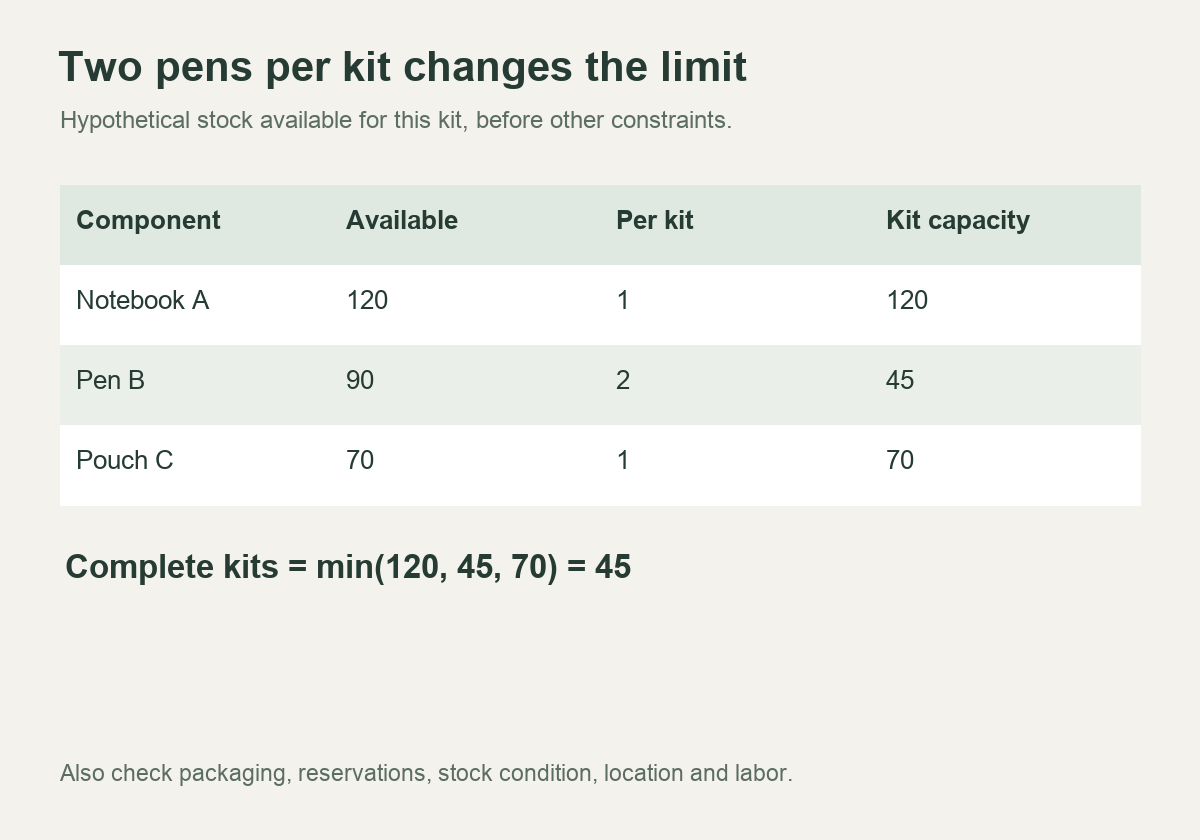
Before using this number operationally, deduct allocations to other orders and exclude damaged or held stock. Check that the components are at a location that can perform the work. A total across several warehouses may not be usable for a single build without transfers.
This calculation estimates material capacity. It says nothing about available labor, packing-station capacity, quality approval, or the carrier cutoff.
Record the inventory movement when kits are built
Suppose you prebuild 20 of the desk kits and use a finished-kit inventory model. The material movement is:
| Stock record | Before build | Consumed or created | After build |
|---|---|---|---|
| Loose notebooks | 120 | −20 | 100 |
| Loose pens | 90 | −40 | 50 |
| Loose pouches | 70 | −20 | 50 |
| Finished desk kits | 0 | +20 | 20 |
The remaining loose components support 25 more kits: min(100, 50 ÷ 2, 50) = 25. Together with the 20 finished kits, material still supports the original total of 45. Building has changed the form and availability of stock; it has not created extra components.
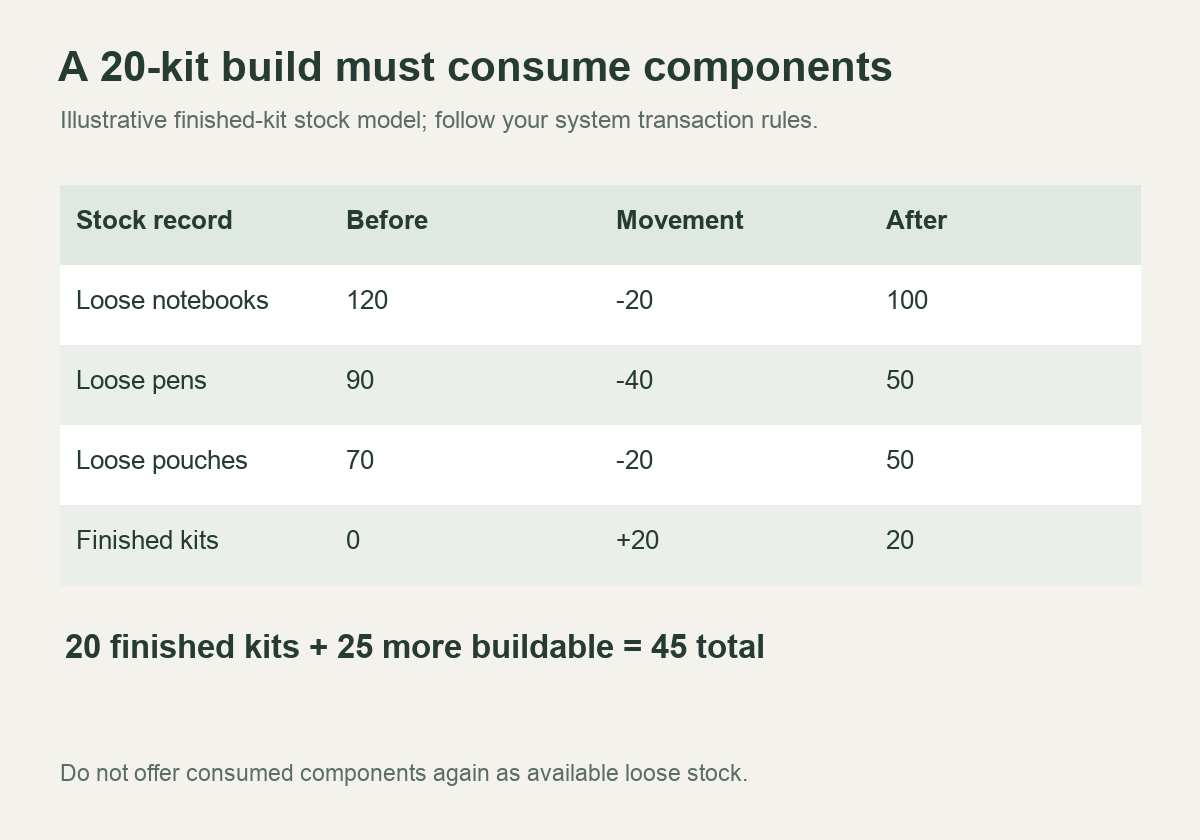
Do not leave the original 90 pens available for standalone sale while also offering 20 finished kits that already contain 40 of those pens.
If your system uses a virtual kit instead, it may retain inventory at component level and consume components at fulfillment. In that case, physically prepacked units need a reservation or location/status process that keeps them from being promised twice. Use the transaction model your system supports; do not create an extra finished-stock balance without accounting for its components.
Test one complete order path before launch: component allocation, kit build if applicable, order release, shipment, cancellation, and return. Compare physical stock with the resulting records at each stage.
Make the quality check specific
“Check the kit” is too vague for a repeatable operation. Define what the operator must verify and what evidence is retained.
For the desk kit, a suggested check might confirm one correct notebook variant, two correct pens, one pouch, the current insert, and the approved presentation. Packaging checks could include closure, label identity, and protection of the contents. These are examples to adapt, not a universal inspection standard.
Scanning can help verify item identity and quantity where the system supports it. Tulip’s documented workflow checks component availability, whether a component is required, and whether it has already been picked. That illustrates useful control questions; it does not establish that scanning alone verifies condition or presentation. Tulip component verification.
If lot, serial, or expiry tracking matters, define how the kit remains linked to its components. Record the actual information used in the build, rather than assuming the kit label contains everything needed for later tracing.
A missing component should trigger a defined exception. Staff need to know whether to hold the kit, use an approved substitute, split the shipment, or ask for a decision. Do not let an informal substitution become the default product specification.
Plan returns and de-kitting before launch
A returned kit may be complete, partly missing, damaged, or opened but usable. Those conditions lead to different inventory actions.
If you put the returned finished kit back into available stock, verify that it still meets the kit specification. If you dismantle it, decrease the finished-kit quantity and return only accepted components to the appropriate stock records. Damaged or unverified parts should remain unavailable.
In a component-tracked model, reconcile the returned members individually according to your workflow. Do not restore both the full kit and its components.
Separate the physical decision from the customer refund decision. A partial return might need a particular refund allocation, but that does not determine whether the recovered item can be resold. Agree the customer policy and the warehouse disposition instructions before orders start arriving.
Compare the full cost of each method
Ask for a quote that separates setup, labor, packaging, storage, outbound handling, and exception work. Confirm whether the kit charge replaces ordinary component picks or is added to them.
For a narrow hypothetical comparison, suppose pre-kitting costs $80 per setup plus $1.20 per kit, while order-time kitting costs $2.00 per kit with no setup fee. At 200 kits, the respective kitting charges are $320 and $400. At 50 kits, they are $140 and $100.
The arithmetic break-even point is $80 ÷ ($2.00 − $1.20) = 100 kits. This compares only the stated kitting charges, assuming all prepared kits are used. Packaging, storage, shipment, rework, and unused kits are excluded. It is not a total-cost recommendation.
If demand is uncertain, ask what happens to unsold sets. Can components be recovered? What labor and packaging would be lost? A lower preparation fee can be outweighed by work on kits you never ship.
Give a fulfillment provider a usable handoff brief
Send the component list and approved packing example, then specify build timing, expected volume, inventory treatment, quality checkpoints, return handling, and change approval. Ask the provider to confirm each part of the workflow and quote the work on the same basis.
The guide to choosing a 3PL for a small business includes questions for special handling and project pricing. Use those questions to expose assumptions before accepting a quote.
Fulfillbot’s pick and pack service describes combining multiple products in a package. Use your exact kit specification to confirm what work can be performed, how it will be recorded, and what it will cost. Specialized assembly, regulated-product handling, and particular inventory integrations need explicit confirmation.
Frequently asked questions
Does every kit need its own SKU?
It needs an unambiguous identifier in the selling and operating workflow. Whether it also has a separate stock balance depends on the system and item type. A distinct sales SKU does not necessarily mean finished-kit inventory is tracked separately.
Can kit components also be sold individually?
Yes, if allocations and inventory updates prevent the same units from being promised twice. Pay particular attention to components already placed in prebuilt kits but still shown as available loose stock.
Does kitting always reduce fulfillment cost?
No. It can simplify repeated work or shift labor ahead of order release, but setup, storage, changes, and unused kits can offset those benefits. Compare the actual workflow and volume, then check a small production run before committing to a large build.