Need UPS to collect a package from your home, office or warehouse? Use the official Schedule a Pickup tool. For a one-time U.S. pickup charged at retail rates, UPS currently lists $9.65 for a future-day request and $15.75 for a same-day request. Those are pickup charges, separate from the cost of shipping, and surcharges may apply.
This guide is about UPS coming to you for an outbound package. If you want to collect an incoming package from a UPS location, use the UPS location finder or your UPS My Choice options instead.
Go straight to UPS: Schedule a one-time pickup · Manage your pickups · Find a drop-off location
How to schedule a one-time UPS pickup
You do not need a recurring pickup plan just to send one box. UPS calls its occasional service UPS On-Call Pickup. A single request can cover multiple eligible UPS packages at the same location, and the fee is charged per request rather than per package.
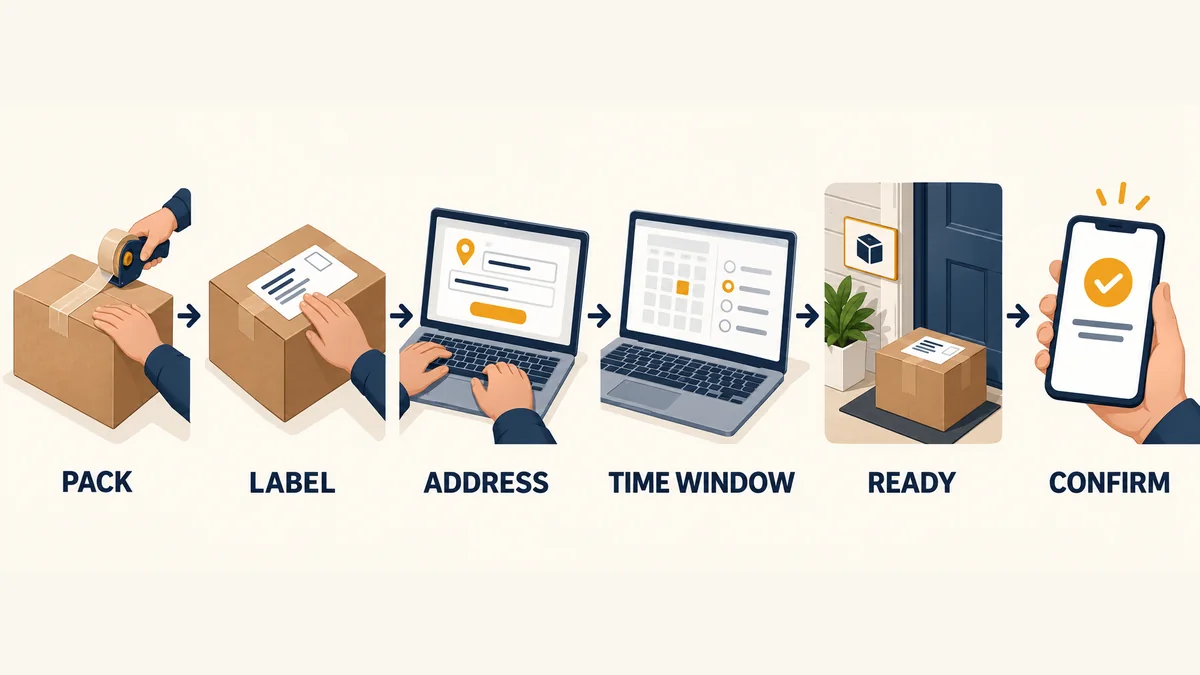
Here is the shortest reliable route:
- Create and attach a valid UPS shipping label to every package.
- Open the official UPS pickup form.
- Enter your shipping-label details or tracking numbers when requested. If a merchant supplied a return label, this step can also show whether the pickup charge was prepaid.
- Add the pickup address, contact details and number of packages. Give accurate total weight and note any package over 70 lb when the form asks.
- Choose same-day or a future business day, subject to local availability.
- Enter the earliest time the packages will be ready and the latest time UPS can access them. Add concise driver instructions for a reception desk, loading door, gate code or safe pickup point.
- Review the displayed charge before paying or billing the request to an eligible account.
- Save the confirmation number and confirmation email. You will need them if you modify, cancel or question the request.
Do not treat a preferred time as a guaranteed appointment. UPS plans pickups within operating routes, and the available window depends on your address, service and booking time. If the parcel must leave before a firm cutoff, a staffed drop-off point may be safer than waiting for a late-day collection.
Can UPS pick up from a house?
Yes. The retail guide says an On-Call request can be made for a location of your choosing, not only a commercial office. The pickup form will determine what is available at your address. Residential, area and fuel surcharges may increase the amount shown at checkout.
Leave the package where the driver can reach it only if the location is secure and your instructions are clear. An exposed parcel can be damaged by weather or taken before UPS arrives. If a building has controlled access, use a staffed reception point or make sure someone can admit the driver throughout the pickup window.
Can you call UPS for a pickup?
UPS lists 1-800-PICK-UPS (1-800-742-5877) for U.S. customer service and On-Call pickup requests. The web form is usually easier because it gives you the date, charge and confirmation in writing. Freight pallets and UPS Worldwide Express Freight follow different pickup procedures, so do not use ordinary small-package instructions for those shipments.
How much does a UPS pickup cost in 2026?
UPS pickup does not have one universal price. The number depends on the rate guide attached to the shipment or account, the pickup type, address and applicable surcharges.
The current U.S. Retail Rate & Service Guide, updated September 7, 2026, lists these standard charges:
| Pickup option | Published retail charge | How it is billed |
|---|---|---|
| Future-day UPS On-Call Pickup | $9.65 | Per pickup request |
| Same-day UPS On-Call Pickup | $15.75 | Per pickup request |
| UPS Smart Pickup | $18.50 | Per week |
| Day-Specific Pickup, 1 day | $8.00 | Per week |
| Day-Specific Pickup, 2 days | $15.75 | Per week |
| Day-Specific Pickup, 3 days | $23.25 | Per week |
| Day-Specific Pickup, 4 days | $30.50 | Per week |
| Daily On-Route Pickup | $11.25 | Per week |
| Daily Pickup | $39.00 | Per week |
Source: 2026 UPS U.S. Retail Rate & Service Guide. These are published pickup charges, not a quote for your shipment. UPS notes that residential, area and fuel surcharges may apply.
Why might your UPS account show a lower price?
UPS publishes a separate Daily Rate guide for eligible accounts. Its current one-time package pickup figures are $5.80 for future-day and $6.90 for same-day service. That does not make the retail table wrong. It means the two prices belong to different rate programs.
Check which rate guide applies before using a blog post, spreadsheet or old invoice as your budget. Contract discounts and account-specific terms can produce another number. The amount displayed in the UPS booking flow or on your account agreement is the one that matters for your request.
Is UPS pickup free?
Usually not when you book a dedicated pickup. A prepaid shipping label covers transportation unless the merchant or shipper also paid for pickup. UPS explicitly warns in its scheduling flow that a prepaid label does not automatically mean a prepaid pickup.
The common no-pickup-fee alternative is to take the labeled parcel to an eligible UPS Access Point, The UPS Store, Drop Box or Customer Center. Confirm that the location accepts your package size and service before making the trip. UPS also says you may hand a labeled package to a UPS driver you encounter, but that is not a scheduled stop and should not be your plan for a deadline-sensitive shipment.
Which UPS pickup option should a business choose?
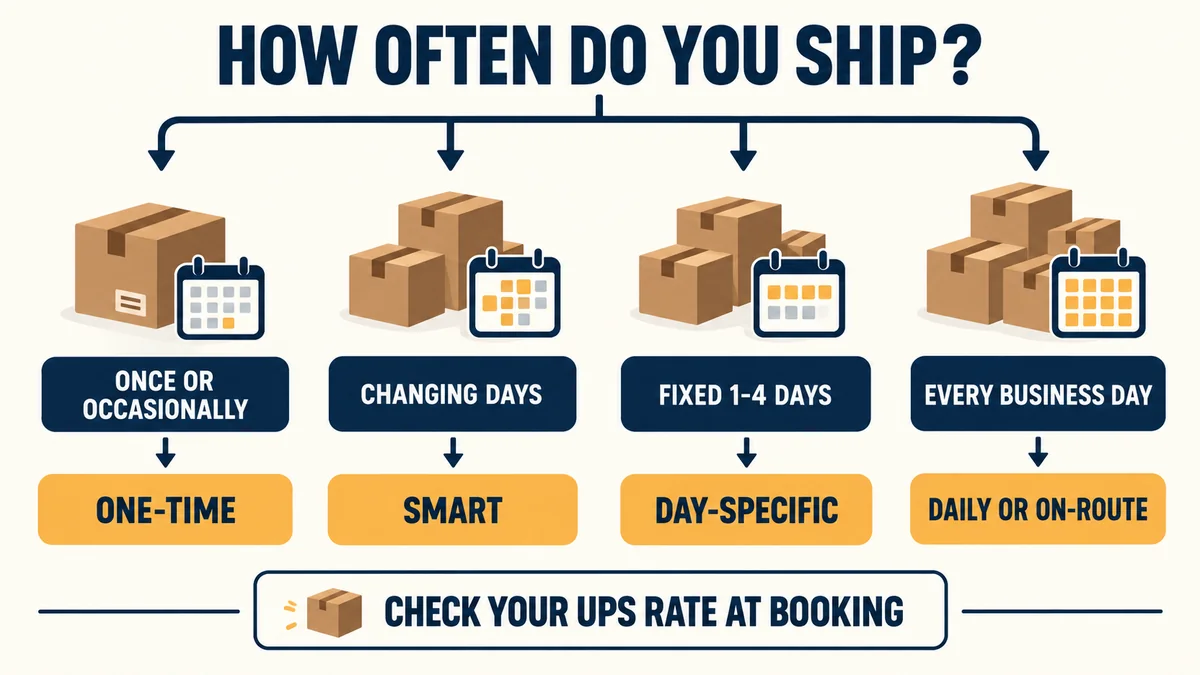
Match the service to the days when parcels are actually ready. Paying for five scheduled stops when you ship twice a week adds cost and invites empty driver visits. Booking every request by hand can be equally wasteful when orders leave daily.
| Your shipping pattern | Option to compare first | Why it may fit |
|---|---|---|
| An occasional batch or urgent one-off | On-Call Pickup | One request, with same-day or future-day choices |
| Regular volume that changes from day to day | Smart Pickup | You confirm a stop only when packages are ready |
| Parcels leave on the same 1 to 4 weekdays | Day-Specific Pickup | A fixed schedule without paying for every weekday |
| You want a weekday stop while the driver is already in the area | Daily On-Route Pickup | Lower published retail weekly fee, but a broader operating window |
| Packages leave every business day and timing consistency matters | Daily Pickup | A scheduled weekday collection at the higher weekly fee |
Smart Pickup deserves a closer look for e-commerce operations with uneven order volume. UPS says the pickup can be triggered through UPS shipping platforms and compatible third-party systems. The first eligible shipment must be processed and the pickup confirmed by your account’s notify-by time for same-day service. UPS says this cutoff is typically about one hour before the desired pickup time, but your dashboard shows the actual account setting. Miss it and the Smart Pickup normally rolls to the next business day unless you buy a separate same-day request.
Use a four-week shipping log before changing plans. Record the days parcels were ready, how many boxes waited overnight and how much staff time went into ad hoc booking. The right choice is the one that fits the real dispatch pattern, not the most familiar service name.
For stores that have outgrown carrier-by-carrier handoffs, the issue may be broader than pickup fees. A fulfillment partner can combine inventory receiving, order processing, carrier selection and dispatch. Our guides to order fulfillment and 3PL vs. 4PL explain that operational boundary.
Can you schedule UPS pickup with a prepaid or return label?
Yes, if the parcel has a valid UPS label and the return method allows you to hand it to UPS. Attach the label, then enter its tracking number in the pickup form. UPS lets you use the tracking details to check whether the merchant prepaid the pickup charge as well as the shipping.
That distinction solves many return problems:
- Prepaid shipping only: The merchant paid to move the parcel through the network, but you may still pay for a home pickup.
- Pickup also prepaid: The merchant arranged or funded collection. Follow its instructions and avoid buying a duplicate request.
- QR code or label-free store return: This may require a participating retail counter. It is not automatically suitable for a driver pickup.
- Call tag or driver-supplied label: The merchant may have created a specific collection request. Confirm the date and whether the driver is bringing the label before attaching anything else.
Amazon and other retailers offer several return methods under the same brand. Read the exact return instructions instead of assuming every UPS-labelled return works the same way. If the page tells you to take a QR code to a particular location, scheduling a normal home pickup may leave the driver without a usable shipping label.
UPS’s return guide also says to remove old labels when reusing a box, seal it with suitable packing tape and know its weight and dimensions.
How to prepare packages for pickup
Have the shipment completely ready before the earliest pickup time. A driver stop is the handoff stage, not a packing appointment.
- Use a sturdy box with enough cushioning for the item.
- Remove or cover every old shipping label and barcode.
- Seal all open seams with shipping tape. UPS recommends plastic or nylon tape at least two inches wide and advises against duct tape.
- Place one correct, readable UPS label on a flat surface.
- Match the package count, total weight and service details to the pickup request.
- Separate any parcel that needs special handling and check the rules for restricted or hazardous goods before booking.
- Keep the packages together in the stated pickup area, protected from rain and public access.
- Give the driver a clear route to the boxes. For a business, name the door, floor, reception desk or loading bay.
For a larger dispatch, make a simple handoff list with tracking numbers and package count. Do not publish or email an unredacted list outside the people handling the shipment. A pickup confirmation proves the request was placed; package tracking and carrier scans are the better records for individual parcels after handoff.
Pickup times, cutoffs and confirmation numbers
Three records are easy to mix up:
- Pickup confirmation or PRN: Evidence that UPS accepted a pickup request.
- Package tracking number: The identifier printed on one shipment label.
- First physical scan: Evidence that the package entered the carrier’s operational stream.
A confirmation does not mean the driver has collected every box. Likewise, a label-created tracking event may exist before UPS has the parcel. Save the pickup reference, then watch each tracking number for physical movement.
Smart Pickup users receive a Pickup Reference Number, and UPS says pickup status, details and history are available in the Pickup Dashboard. For a one-time request, keep the confirmation email and use the manage or modification link provided with the booking. Recurring-pickup changes can take up to three business days to apply, so do not edit the schedule at the last minute and assume the next route has changed.
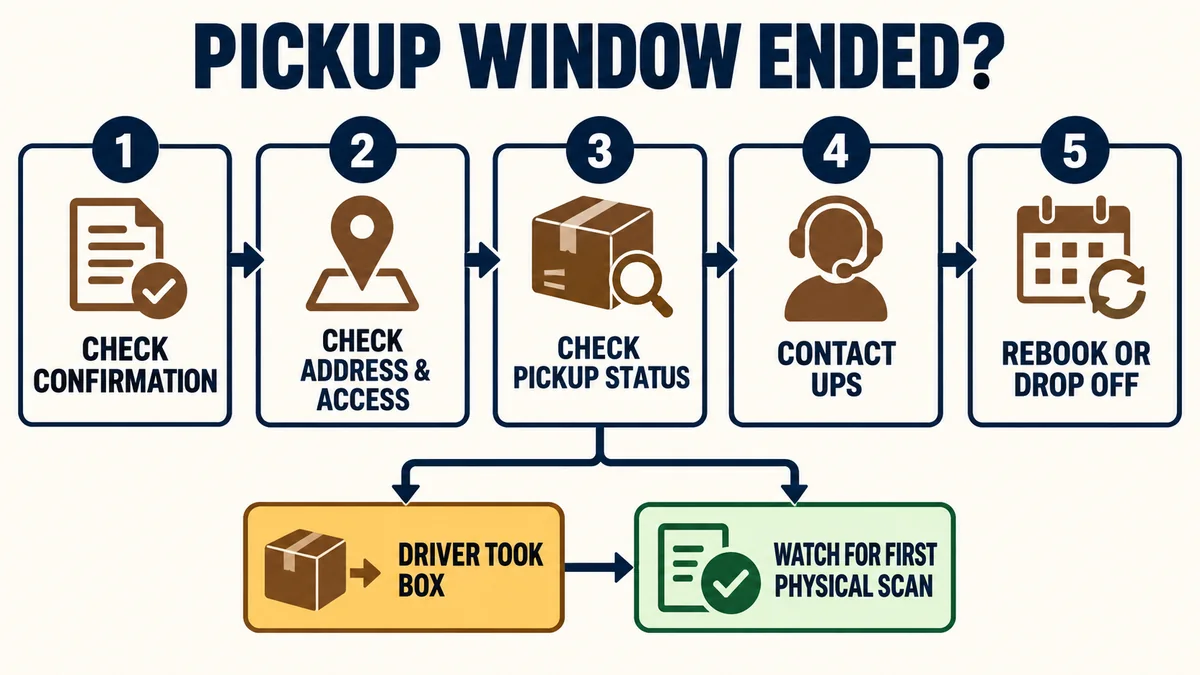
What to do if UPS misses the pickup
Start with the request record, not the shipment tracking page. Check the date, address, package count, earliest-ready time, closing time and driver instructions. Then confirm that access was possible for the whole window.
If the window has ended and the boxes are still there:
- Check the UPS Pickup Dashboard or the management link in your confirmation.
- Note the pickup confirmation or PRN, plus the tracking numbers. Keep the two types of reference separate.
- Look for a cancellation, reschedule or failed-attempt message.
- Contact UPS at 1-800-742-5877 if the status does not explain what happened.
- If the shipping deadline is near, ask whether to rebook or take the packages to an eligible staffed location. Do not create and pay for duplicate requests until you know the first request’s status.
If a driver took the packages but tracking still shows only “Label Created,” allow time for the next operational scan, then contact UPS with both the pickup reference and affected tracking numbers. Do not promise a customer that every parcel will receive an immediate doorstep scan. Scan timing varies by handoff and route.
What if you entered the wrong address or time?
Use the modification or cancellation route connected to the original request. If the interface will not allow a change, call UPS with the confirmation number. For a recurring plan, remember that setting changes may take up to three business days. A one-off request may be the practical bridge while the recurring schedule updates.
What if only some packages were collected?
Compare the remaining boxes with the package count and services entered in the request. Photograph the group as an internal record if the handoff matters to a customer claim, but protect readable addresses and tracking numbers. Contact UPS with the pickup reference and the specific uncollected tracking numbers. If you arrange another collection, make sure you are not paying twice for the same completed portion of the job.
For customer-facing delays after pickup, a clear exception workflow matters as much as the carrier inquiry. See our guide to delivery exceptions for communication and escalation steps.
When drop-off or outsourced fulfillment makes more sense
A pickup saves travel, but it also creates a waiting window. Drop-off can be the better choice when you have one small parcel, need a staffed acceptance point or are close to a UPS location. Check the location’s services and size limits first; a Drop Box is not a substitute for every package or return type.
Recurring pickup becomes attractive when staff are losing time to daily store runs or when packages regularly miss outbound cutoffs. Once the operation is managing several carriers, inventory locations or sales channels, optimizing a single pickup fee will not fix the underlying workload. That is the point to compare in-house shipping with an order fulfillment service that can receive inventory, pack orders and manage carrier handoffs as one process.
UPS pickup FAQ
How do I schedule a UPS pickup?
Attach a valid UPS label, open the official pickup form, enter the address and package details, choose an available date and access window, review the charge, and save the confirmation number.
How much does UPS charge for a pickup?
For U.S. retail rates effective September 7, 2026, UPS lists $9.65 for a future-day On-Call request and $15.75 for same-day service. Eligible Daily Rate accounts currently list $5.80 and $6.90 instead. Surcharges and contract terms can change the final price.
Will UPS pick up a package at my home?
Yes, where the service is available. Enter the residential address in the booking tool and review the displayed charge. Residential, area and fuel surcharges may apply.
Does a prepaid UPS label include pickup?
Not necessarily. A label can have prepaid transportation while the pickup remains unpaid. Enter the tracking number in the UPS scheduling flow or ask the merchant whether collection was included.
Can I schedule UPS pickup without an account?
The online one-time pickup flow is designed for occasional requests and lets you enter label and payment details. A UPS account is needed to enroll in recurring pickup options. The form will show the choices available for your shipment and address.
Can UPS pick up several packages in one request?
Yes. UPS says one On-Call request can include multiple eligible Air, International, UPS 3 Day Select and Ground packages at one pickup location. The pickup fee is per request, not per package, although other shipment charges still apply.
How do I check UPS pickup status?
Use the pickup confirmation or Pickup Reference Number in the UPS pickup-management tools. Use each package’s tracking number separately to follow shipment scans after collection.
Can I give a return package to a UPS driver?
UPS says a labeled return may be handed to a UPS driver. That is convenient when a driver is already present, but it is not a guaranteed scheduled stop. Use a paid pickup or an eligible drop-off point when timing matters.
Does UPS pick up on Saturday?
UPS offers Saturday pickup in eligible areas and for eligible services. Availability and charges vary, so check the booking flow for the specific ZIP code and shipment rather than assuming a weekday rate or cutoff applies.
Sources and update note
This independent guide was checked against UPS’s U.S. pickup pages, return instructions, Smart Pickup FAQ, and the Retail and Daily Rate guides available on September 10, 2026. It is not sponsored by or affiliated with UPS. Rates, service areas, cutoffs and page flows can change; confirm the final details in the official booking tool before arranging a time-sensitive shipment.